One year of rsh
Hard to imagine that it's already been a year since Rsh first went public. At the time, it was largely a demo of what could be possible, but still needed quite a bit of work to make it ready for everyday use. A year later and we've learned a lot, and made a few mistakes along the way. In this post, we look back over the year and see how we did and where we might be going in the future.
History
When Rsh first started, it started with a simple idea: the
output of ls, ps, and
sysinfo should all output the same thing. Taking a
page from PowerShell, we explored outputting structured data and
quickly settled on a table design that would support the output
of each of the three commands, with the added ability of
streaming the output as it became available.
Around this idea, we then built a set of "filters",
like the where clause, borrowed from SQL, and a
growing set of data types we would support natively. Soon, we
were able to write more complex statements like
ls | where size > 10kb. This became the crux of
the idea - commands that output values from a core set of data
types into a stream, composed together with the traditional UNIX
pipe (|), so that you could build up a complex set
of commands that work over the data as it streams through.
rsh today
Contributors
Before we got started talking about rsh today, we wanted to give a big "thank you!" to everyone who has contributed to Rsh to get us to this point. Rsh is what it is because of your help.
1ntEgr8, AaronC81, AdminXVII, aeosynth, aeshirey, aidanharris, almindor, Aloso, Amanita-muscaria, amousa11, andrasio, Andrew-Webb, arashout, arnaldo2792, avandesa, avranju, bailey-layzer, BatmanAoD, bndbsh, Bocom, boisgera, Borimino, BradyBromley, BurNiinTRee, Byron, candostdagdeviren, casidiablo, charlespierce, chhetripradeep, cjpearce, coolshaurya, cristicismas, DangerFunPants, daschl, daveremy, davidrobertmason, Delapouite, dependabot[bot], Detegr, devnought, Dimagog, djc, drmason13, DrSensor, elichai, eltonlaw, EmNudge, eoinkelly, equal-l2, est31, fdncred, filalex77, Flare576, gilesv, gorogoroumaru, GuillaumeGomez, hdhoang, he4d, hilias, HiranmayaGundu, hirschenberger, homburg, iamcodemaker, incrop, ineol, Jacobious52, jankoprowski, JCavallo, jdvr, jerodsanto, JesterOrNot, johnae, johnterickson, jonathandturner, JonnyWalker81, jonstodle, JosephTLyons, jzaefferer, k-brk, Kelli314, klnusbaum, kloun, kornelski, kubouch, kvrhdn, landaire, lesichkovm, LhKipp, lightclient, lincis, lord, luccasmmg, marcelocg, matsuu, mattclarke, mattyhall, max-sixty, mfarberbrodsky, mhmdanas, mike-morr, miller-time, mistydemeo, mlbright, mlh758, morrme, nalshihabi, naufraghi, nespera, neuronull, nickgerace, nmandery, notryanb, oknozor, orf, orientnab, oskarskog, oylenshpeegul, pag4k, Paradiesstaub, philip-peterson, piotrek-szczygiel, pizzafox, pka, pmeredit, pontaoski, Porges, pulpdrew, q-b, quebin31, rabisg0, ramonsnir, rimathia, ritobanrc, rnxpyke, romanlevin, routrohan, rrichardson, rtlechow, rutrum, ryuichi1208, Samboy218, samhedin, sandorex, sdfnz, sebastian-xyz, shaaraddalvi, shiena, siedentop, Sosthene-Guedon, Southclaws, svartalf, taiki-e, Tauheed-Elahee, tchak, thegedge, tim77, Tiwalun, twe4ked, twitu, u5surf, UltraWelfare, uma0317, utam0k, vsoch, vthriller, waldyrious, warrenseine, wycats, yaahc, yahsinhuangtw, yanganto, ymgyt, zombie110year
What is rsh?
rsh is an interactive programming language for working with your files, your system, and your data as a shell, a notebook, and more.
Rsh is more than a shell
It's easy to think of rsh as just a shell. It's even got 'shell' in the name. It's the first and probably main way you'll interact with it. So why say it's "more than a shell"?
In truth, rsh is actually two things at once: Rsh and rsh. Rsh is an interactive language for processing streams of structured data, data that you're probably getting from files, your system, a web address, etc.
So what's rsh?
rsh is taking the Rsh language and putting it into a shell, and building around it a set of shell features to make it feel comfortable to use as a login shell. Completions, pretty error messages, and the like.
When we say that "Rsh is more than a shell", does that imply that Rsh can be used in other places, too? Absolutely. We've got two more hosts that let you run Rsh, a jupyter-based host that lets you run Rsh in jupyter notebooks, and a WebAssembly-based host that we use to create the Rsh playground
The idea of Rsh runs deeper than just the shell, to being a language that's relatively easy to learn, yet powerful enough to do real work with your system, to process large amounts of data, to interactively let you iterate quickly on an idea, to invite exploration by building up a pipeline one piece at a time. There's really no shortage of ambition for where we hope to go.
The design of Rsh
Rsh's original design has proven surprisingly robust thus far. Some of its core ideas are continuing to pay dividends a year later. Let's look at the designs that still feel right.
Pipelines are infinite
When we first started writing Rsh, we took a few shortcuts that
had us processing all the data in a pipeline at once. Very
quickly, we realize this wasn't going to work. External
commands (think cat /dev/random) can output an
infinite stream of data, and the system needs to be able to
handle it. Understanding this, we transitioned to a different
model: data flows between command as infinite streams of
structured data. As the data is processed, we avoid collecting
the data whenever possible to allow this streaming to happen.
Because the streams can be infinite, even the printing out of tables is done a batch at a time.
Separating viewing data from the data itself
Coming from other shells, the idea of running
echo or ls goes hand-in-hand with
printing something to the terminal. It's difficult to see
that there two steps going on behind the scenes: creating the
information and then displaying it to the screen.
In Rsh, these two steps are distinct. The
echo command gets data ready to output into stream,
but doesn't do any work to print it to the screen. Likewise,
ls gets ready to output a stream of file and
directory entries, but doesn't actually display this
information.
That's because both echo and
ls are lazy commands. They'll only do the work
if the data is pulled from the stream. As a result, the step of
viewing the data is separate from the step of creating it.
Behind the scenes, Rsh converts a standalone ls to
be the pipeline ls | autoview. The work of viewing
comes from autoview and it handles working with the
data and calling the proper viewer. In this way, we're able
to keep things as structured data for as long as possible, and
only convert it to be displayed as the final step before being
shown to the user. (note: the wasm-based demo and jupyter do a
similar step, but instead of adding autoview, they
add to html)
Rich data types
In a similar way to working with structured data, rather than only plain text, Rsh takes a different approach to data types as well. Rsh takes the traditional set of basic types, like strings and numbers, and extends them into a richer set of basic data primitives.
Numbers are represented internally as big numbers and big decimals, rather than integers and floating point machine-based representations. This gives us more flexibility to do math more accurately, and generally removes the worry of whether the number you want to work with will fit in the integer or float size you have available.
We carry this further, by also representing values common in modern computer usage: URLs, file paths, file sizes, durations, and dates are all examples of built-in data types. By building them in, Rsh can have better syntax and type checking with their use.
For example, in Rsh it's possible to write
= 1min + 1sec to create a duration that is one
minute one second long. You can also use the file sizes, like
being able to filter a directory list by the size of the file
ls | where size > 10kb.
Rsh also can help if you try to mix types that shouldn't.
For example, if you had written: = 1min + 1kb it
seems you didn't mean to add time and file sizes together,
and Rsh gives you an error if you do:
error: Coercion error
  ┌─ shell:1:3
  │
1 │ = 1min + 1kb
  │   ^^^^   --- filesize(in bytes)
  │   │
  │   duration
note: we'll be making this error better in the future
Data in Rsh also isn't just the value, but it's also a
set of metadata that comes with the value. For example, if you
load data from a file using the open command, we
track the place that it's loaded along with the data
that's loaded. We can see this metadata using the
tags command:
open package.json | tags
───┬─────────────────┬──────────────────────────────────────────────────────────────────────────────
 # │      span       │                                    anchor
───┼─────────────────┼──────────────────────────────────────────────────────────────────────────────
 0 │ [row end start] │ /home/jonathan/Source/servo/tests/wpt/web-platform-tests/webrtc/tools/packag
   │                 │ e.json
───┴─────────────────┴──────────────────────────────────────────────────────────────────────────────
This extra information allows us to know how to view the
contents, and even save you time when you use the
save command, as it will use the original location
by default.
Keeping it fun
Something we attached to early on was the idea that Rsh should be fun. It should be fun to work on, it should be fun to contribute to, and it should be fun to use.
Rsh is really about play. You play with your data, you play with the structures that make up your files and filesystem, you play with what web services give back to you. Everything about Rsh is made to invite you to explore how things work and how data is put together. As you play, you learn more about Rsh works and how to better use it. We firmly believe that learning doesn't have to hurt. At its best, the pleasure of exploration over time yields expertise without punishing you along the way. Humans just get better at something when we love to pick it up day after day, experimenting as we go. With Rsh, we can ask questions like "what if I do this?" because the system is built to let us ask the question and answer it ourselves.
Rsh takes this one step further. The error reporting system comes from the design of Rust's error messages, with clear messages to help guide you to success.
The goal for Rsh is that it won't require you to be a wiz with the commandline or with complex programming practices. Instead, you start where you feel comfortable, and grow a line at a time. With Rsh, as your comfort grows, single lines easily grow to multiple lines, and (eventually) to larger programs. You don't need separate styles of thinking when experimenting and another for building your application. In Rsh, these are (or will be) one and the same.
Crossplatform
One of the first decisions we made in making Rsh is that it should not only be cross-platform, but should feel as native as possible across platforms. Commands should work the same, regardless of the platform you're on, without any loss of functionality if you switch from one OS to another. This has meant saying "no" a few times when someone offered to a cool feature, only to find out it didn't work well on one of the supported systems. The benefit, though, is that Rsh users can move between OSes comfortably.
Rsh lets you use common shortcuts, too. In Windows, you can
change drives using the common D: shorthand. You
can use cd ~ and cd - as easy
shorthands to jump between home and previous directories, too.
Getting $it right
Early on, when we were first brainstorming how something like rsh might work, we rediscovered the idea of iteration having its own special variable. The iteration variable, item variable, or simple the "it" variable, gave us a way to talk about the current row of data flowing through the pipeline. When we can talk about the current row, it was then easier to say how to handle the current row.
The simplest version is:
ls | echo $it
To echo $it doesn't really do anything
interesting, it just passes along the value it was handed.
It's when we combine this with variable paths that things
get a little more interesting:
ls | echo $it.name
Now, in 4 words we've asked Rsh to list all the files in the current directory and output only the names. This pipeline, if there are 100s of thousands of files, will happily stream out its results as it finds new files. As in this case:
ls **/* | echo $it.name
Once you have a mental model for using $it, it
becomes common to grab it when working on data a row at a time.
A note for those wondering how this works under the hood: if an
$it is found a part of an argument not otherwise
inside of a block, it's "it-expanded". We replace
the command with a call to each and the block.
This turns:
ls | echo $it.name
Into:
ls | each { echo $it.name }
The each command handles walking along each row and
calling the block each time, setting the variable
$it to the current row value.
Everything is a macro
In Rsh, a command has the form
<cmd> <arg1> <arg2>. To the
lisp-lovers among you, this should look very familiar. Slap on a
pair of parens and you have yourself an s-expression.
You may be wondering - if you choose a cmd-arg-arg form, how do you write something like:
where size > 10kb
This is where Rsh's parser steps up. The parser we use is a
type-driven, recursive descent parser. If you look at the
signature for the where command in the Rust code,
you'll see it says:
Signature::build("where").required(
    "condition",
    SyntaxShape::Math,
    "the condition that must match",
)
That is, the where command takes a single
parameter, a condition, which has a SyntaxShape of
Math. This shape drives the parser to use different parser
logic.
In math mode, we can now parse an expression using operator
precedence. The where command tells the parser to
treat all of the free parameters as a single expression, to
parse that expression, and to pass it as the single argument.
The canonical form is more precise, though a bit more
cumbersome:
where { = $it.size > 10kb }
You can also see a few other steps thrown in, like the expansion
of a short-hand path into the full variable path using
$it.
Kebabs and question marks
Being able to use - in the names of commands,
sometimes called "kebab case", is a handy feature and
one we enjoy. In Rsh, you can use it whenever you need to pass
an identifier. kebab-case-rules.
In addition to kebab case, you can use ? as part of
the identifier, allowing names in a Ruby-style. We use it in the
command empty?.
Code growth
rsh currently sits at just over 55k lines of code, built from almost 1300 merged pull requests.
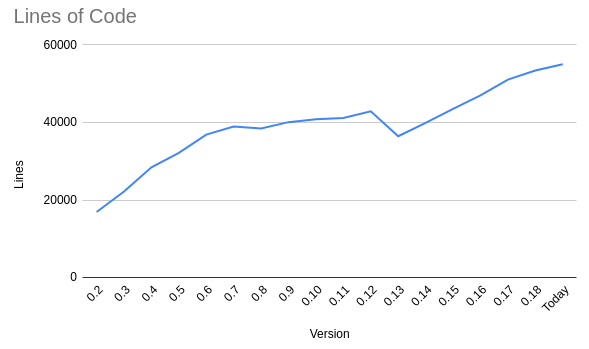
Growth in code size with each version
Surprises?
It's funny, when you start working on a shell it's easy to think "it'll be like a REPL". In fact, it's closer to creating an interactive IDE for the terminal. As people came to Rsh from other shells, including shells like fish, there was a strong assumption that completions would be stellar, that it will integrate well with existing workflows, and it will support configuring the prompt, the keybindings, and more.
It also turns out that getting a shell correct is a lot more experimentation and a lot less following what the textbooks say. In practice, things like 'stdout' and 'stderr' are used in a variety of ways, as are the exit codes output by programs. Our initial designs started with a stricter view of these ideas, and softened over time as we saw that the real world is a much fuzzier place than we realized.
Quirks
Rsh hasn't been without a few quirks. Like any awkward growth spurt, we've had our awkward times and still have a few "curious" areas.
No variables, yet
Had you a time machine and told us a year ago that we still wouldn't have variables today, we probably wouldn't have believed you. Isn't that an important part of a language?
Yes, it's definitely important. But we're also surprised just how far you can get without them. When you think about how you work with a piece of data, maybe you break it apart, maybe you work over the lines, or maybe you search inside of it. Each of these has a built-in way to perform the task in Rsh and none require user-defined variables.
That, of course, has its limits. At some point you want to take the result of one batch of commands and store it for later. We're thinking through how to do this, and it comes down to a few basic questions:
- Should variables work in a traditional way? That is, should we fully evaluate what we pass to the variable during assignment?
- Or, should Rsh instead "hold" the pipeline you use during the assignment, so that you can run it whenever you want the value of the variable (possibly caching the result if possible)? This is less traditional, but more in line with a language that works lazily on potentially endless streams of data.
There are other questions we still need to answer as well, like how do variables and function definitions play together? How do variables shadow each other (or even if they're allowed)?
To view or not to view
rsh, being a language focused on working on structured data, has
a few quirks with how and when the data is viewed. For one, rsh
has multiple types of data, and different types of data may have
different viewing needs. To help with this, we created
autoview, a command that will look at the data and
detect a variety of different cases. Once it's identified
the shape of the data, it will call out to the viewing command
that handles viewing that particular kind of data.
Autoview is applied to any of the data being output directly to
the user, which is the case for the last step of a pipeline. For
example, the pipeline ls is actually
ls | autoview behind the scenes. The
ls command outputs each row of data corresponding
to the files in the directory, creating a table. These rows are
passed to autoview which detects that we need to
view a table, calls the table command, which then
views the data. This generally feels natural, well, most of the
time.
It makes sense that
ls | where size > 10kb doesn't output the
data that flows between the two commands. If we did, it
wouldn't be clear what the actual answer was. But what about
in this situation: ls; echo "done"? Do we
output the result of ls or not?
In the current version of Rsh, we don't. We treat anything
to the left of ; as "do this, finish it, but
don't run 'autoview'". This let's you do a
series of different kinds of processing and only then view the
end result.
This seems reasonable until you see something like
echo "hello"; echo "world" and
only see the output "world" and then have to stop and
think through all the steps that led to that output.
Getting turned around
As it turns out, the terminal is small. Want to view a few columns? Generally not a problem. Want to open that random CSV file from work with 30 columns? Well, now we might have a problem. How does that 30 column file actually look when you print it out in the terminal, with a nicely drawn table?
For some cases, we found we could be helpful by rotating the table so that the columns go along the side instead of the top. This is especially handy when there's only one row of data as it reads more like a record.
That being said, it's not without its trade-offs. To some folks, rotating the table when they aren't expecting it can be very disorienting. We're still working to figure out the best defaults and heuristics.
Future work
Focus
rsh is in the stage of the project where we're still experimenting with what the language should be, how it works in practice, and finding out what its most important core values are. Rust, the language rsh is written in, went through a similar stage. As it found its most important values, it tried on others. Once people started to create real projects in Rust, and show what was possible with this core part of the language, the design began to gel and then solidify as it arrived at 1.0. As part of that, early ideas were modified or discarded altogether.
rsh will go through a similar stage. As it grows, it will find its sweet spot, its niche that it naturally fills. The design will come from features built to solve real problems, and we'll polish these features, improving their utility, error messages, documentation, and overall flow. The end result will be a sharper, more focused rsh that feels like the tool you want in your toolbox. Some early adopters are already giving us feedback that rsh is well on its way of meeting this role, and we're excited to continue to explore and refine as we go.
Exploring the data model
There are some really juicy open questions that we'll work on in the coming year. We already have a fairly rich set of data primitives, like strings, dates, file sizes, durations, and more. Figuring out what makes sense to be built-in vs what should be added from outside of the core Rsh data model will take a bit of time and finesse as we get more experience working with Rsh in the real world.
Shifting to being a full language
Looking at Rsh today, you can see some common parts of languages
like if or open, but it doesn't
yet feel like there's enough syntax to build up full
programs. You can't define your own commands, your own
variables, and you can't build out a project across multiple
files. We're working to address all of these limitations so
that Rsh can function not only for one-liners, but also for much
more.
Getting completions really good
A regular point of feedback is that people want completions
where possible. We've got some ideas here that will allow us
to have completions in far more places, including external
commands (think git checkout <TAB>).
We're laying the groundwork for this now, and looking
forward to rolling out more functionality as we go.
Conclusion
We had far more support and made far more progress than we could have ever predicted a year ago. Today's Rsh is something many people use as their daily driver, and it gets stronger with each release. We're excited to bring Rsh to a broader audience as we continue to improve usability, grow its feature set, and refine its internals.
If you'd like to try out Rsh, you can download it from the github releases page, from crates.io, or from the many other distributions.
If you'd like to help us create Rsh, please do! You can find us on the rsh github and on our discord server. If you use Twitter, come say hi, we'd love to chat.