rsh 0.6.0
rsh, or Rsh for short, is a new shell that takes a modern, structured approach to your commandline. It works seamlessly with the data from your filesystem, operating system, and a growing number of file formats to make it easy to build powerful commandline pipelines.
We're happy to announce the 0.6.0 release of Rsh. This release has a bunch of new features, bugfixes, and general improvements.
Where to get it
Rsh 0.6.0 is available as
pre-built binaries
or from
crates.io. If you have Rust installed you can install it using
cargo install rsh (or if you want all the features
cargo install rsh --all-features).
Starship support (Southclaws, jonathandturner)
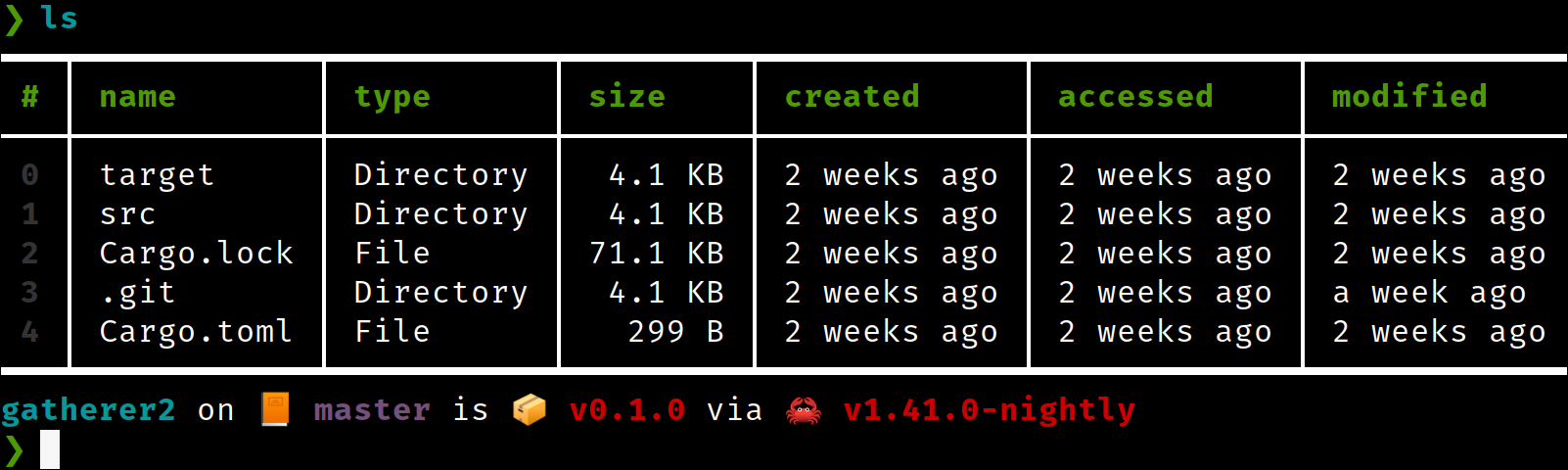 Welcome to the starship!
Having a configurable prompt has been a regularly requested feature, dating back to our first release of Rsh. With 0.6.0, we're excited to show off the ability to integrate with starship. Starship is a powerful prompt being built in Rust, and it includes tons of fun features.
To use the Starship support, enable the starship feature (the binary releases will have this on by default). After this, you'll want to configure starship to meet your needs.
Here's the config I use in the screenshot above:
❯ cat ~/.config/starship.toml
add_newline = false

[git_branch]
symbol = "📙 "

[git_status]
disabled = true
To enable Starship support, make sure to enable the
starship feature, or to use the all-features build:
> cargo install rsh --features starship-prompt
or
> cargo install rsh --all-features
Stable Rust (est31)
Rsh now works on stable Rust!
Contributor est31 did a ton of work soon after our first Rsh release, but it wasn't until just recently that it fully paid off. With the Rust 1.39 release, Rsh now fully works on stable Rust! We're excited for what this means for package authors, as they will now have a stable dependency they can use to build Rsh from, rather than tracking nightly.
New website! New blog! (sebastian-xyz)
We're starting to work on an actual website, complete with a blog. In fact, where you're seeing this now is on our new site. We're excited to finally have something more official, and looking forward to growing the website in the weeks to come.
If you're a web developer or designer and you want to help out, please join us! You can find us on the website repo and blog repo.
New features
histogram (andrasio)
As we extend Rsh's ability to function as a shell, we also
wanted to include some features that help with doing some data
analysis on structured data you're working with. In this
release is a new histogram feature which gives a
quick histogram of the data you're looking at:
> open tests/fixtures/formats/caco3_plastics.csv | histogram origin
━━━┯━━━━━━━━━━┯━━━━━━━━━━━━━━━━━━━━━━━━━━━━━━━━━━━━━━━━━━━━━━━━━━━━━━━━━━━━━━━━━━━━━━━━━━━━━━━━━━━━━━━━━━━━━━━━━
 # │ origin   │ frequency
───┼──────────┼─────────────────────────────────────────────────────────────────────────────────────────────────
 0 │ COLOMBIA │ ***********************************************************************************************
   │          │ *****
 1 │ SPAIN    │ ************************************************************
 2 │ TURKEY   │ ********************
━━━┷━━━━━━━━━━┷━━━━━━━━━━━━━━━━━━━━━━━━━━━━━━━━━━━━━━━━━━━━━━━━━━━━━━━━━━━━━━━━━━━━━━━━━━━━━━━━━━━━━━━━━━━━━━━━━
split-by (andrasio)
When working with tables inside of tables, it's sometimes
helpful to be able to group and regroup data so that the end
result can be easily processed or charted. With this release,
we've add a new command: split-by. Split-by is
similar to group-by, in a way you can think of it
as a re-group as it will create new groups to wrap your existing
groups.
To see how this works, let's say we have some shipping data, and we want to group these by the region:
> open tests/fixtures/formats/caco3_plastics.csv | group-by origin

━━━━━━━━━━━━━━━━┯━━━━━━━━━━━━━━━━┯━━━━━━━━━━━━━━━━
 SPAIN          │ COLOMBIA       │ TURKEY
────────────────┼────────────────┼────────────────
 [table 3 rows] │ [table 5 rows] │ [table 1 rows]
━━━━━━━━━━━━━━━━┷━━━━━━━━━━━━━━━━┷━━━━━━━━━━━━━━━━
Next, let's say we know that inside of these new columns is
a table that has a column called shipped_at. What
we want to do is to group-by again, but this time
use that new column to create new groups:
/home/jonathan/Source/rsh(better_duration)> open tests/fixtures/formats/caco3_plastics.csv | group-by origin | split-by shipped_at
━━━━━━━━━━━━━┯━━━━━━━━━━━━━┯━━━━━━━━━━━━━┯━━━━━━━━━━━━━━━━┯━━━━━━━━━━━━━━━━┯━━━━━━━━━━━━━━━━┯━━━━━━━━━━━━━━
 18/03/2016  │ 27/07/2016  │ 24/06/2016  │ 07/07/2016     │ 01/01/1900     │ 01/11/2016     │ 04/10/2016
─────────────┼─────────────┼─────────────┼────────────────┼────────────────┼────────────────┼──────────────
 [row SPAIN] │ [row SPAIN] │ [row SPAIN] │ [row COLOMBIA] │ [row COLOMBIA] │ [row COLOMBIA] │ [row TURKEY]
━━━━━━━━━━━━━┷━━━━━━━━━━━━━┷━━━━━━━━━━━━━┷━━━━━━━━━━━━━━━━┷━━━━━━━━━━━━━━━━┷━━━━━━━━━━━━━━━━┷━━━━━━━━━━━━━━
What we have as a result is a kind of (row, column) grouping of the table data, which would allow you to graph for each date on one axis, and for each origin on the other.
default and compact (andrasio)
One of the sticky issues working with tables is that sometimes you'll have gaps in the data. Perhaps there just isn't a value for that row.
To help with that, we've added two new commands:
default and compact.
Default, as the name implies, will allow you to give blank spots a default value. Compact instead will allow you to remove a row if there's a blank in that position.
Here's an example of default:
> open amigos.json | get amigos
━━━┯━━━━━━━━━━━┯━━━━━━━━━━━━
 # │ name      │ rusty_luck
───┼───────────┼────────────
 0 │ Yehuda    │          1
 1 │ Jonathan  │          1
 2 │ Andres    │          1
 3 │ GorbyPuff │
━━━┷━━━━━━━━━━━┷━━━━━━━━━━━━
We can default the missing column from the table like this:
> open amigos.json | get amigos | default rusty_luck 1 giving:

━━━┯━━━━━━━━━━┯━━━━━━━━━━━━
 # │ name     │ rusty_luck
───┼──────────┼────────────
 0 │ Yehuda   │          1
 1 │ Jonathan │          1
 2 │ Andres   │          1
 3 │ GorbyPuff│          1
━━━┷━━━━━━━━━━┷━━━━━━━━━━━━
format (jonathandturner)
To add to the abilities of outputting tables of various into
readable strings, we've recently added the
format command. This allows you to convert table
data into a string by following a formatting pattern:
> ls | format "name is {name}"
━━━━┯━━━━━━━━━━━━━━━━━━━━━━━━━━━━
 #  │ <value>
────┼────────────────────────────
  0 │ name is .azure
  1 │ name is features.toml
  2 │ name is Cargo.toml
  3 │ name is LICENSE
  4 │ name is target
  5 │ name is images
  6 │ name is tests
from-xlsx (jonathandturner)
We now have an early start at Excel support. With it, you can now import Excel files as tables.
On-going improvements
Lots of improvements to existing commands this time around.
Simple and full ls (jonathandturner)
To make ls work better on smaller terminals
(including the bog standard 80x24 login size), we've shrunk
ls a tiny bit by default. Have no worry, though,
the original columns and more are available in the new
ls --full.
Fuzzy matching (bndbsh)
❯ ls | where name =~ "yml"
━━━━━━━━━━━━━┯━━━━━━┯━━━━━━━┯━━━━━━━━━━━━┯━━━━━━━━━━━━
 name        │ type │ size  │ accessed   │ modified
─────────────┼──────┼───────┼────────────┼────────────
 .gitpod.yml │ File │ 780 B │ a week ago │ a week ago
━━━━━━━━━━━━━┷━━━━━━┷━━━━━━━┷━━━━━━━━━━━━┷━━━━━━━━━━━━
A long-requested feature is the ability to match strings a bit
more fuzzily. With 0.6.0, you'll be able to do just that
with the new =~ (fuzzy match to include) and
!~ (fuzzy match to exclude) commands.
from-csv, now with separator (drmason13)
Sometimes you might find a .csv file in the wild that uses a
different separator than comma. You can now configure
from-csv to use a different character as the
separator using, for example,
from-csv --separator ";".
nth can take multiple row numbers (andrasio)
You can now pass multiple row numbers to nth. For
example nth 1 3 5 will return those three separate
rows as a new table.
Column paths can now include row numbers (wycats, andrasio)
Sometimes when you're trying to get to data inside an inner table, you want to describe travelling through a particular row to get there. With recent improvements, you can now include the row number in the column path (assuming it is not the first part of the path).
Duration support (jonathandturner, Aloso)
❯ ls | where accessed < 1w
━━━┯━━━━━━━━━━━━━━━┯━━━━━━━━━━━┯━━━━━━━━━━┯━━━━━━━━━━━━━┯━━━━━━━━━━━━━
 # │ name          │ type      │ size     │ accessed    │ modified
───┼───────────────┼───────────┼──────────┼─────────────┼─────────────
 0 │ Cargo.toml    │ File      │   4.7 KB │ an hour ago │ an hour ago
 1 │ Makefile.toml │ File      │    449 B │ 2 days ago  │ 2 days ago
 2 │ README.md     │ File      │  19.5 KB │ an hour ago │ an hour ago
 3 │ Cargo.lock    │ File      │ 170.7 KB │ an hour ago │ an hour ago
 4 │ crates        │ Directory │   4.1 KB │ an hour ago │ an hour ago
 5 │ TODO.md       │ File      │   1.3 KB │ an hour ago │ an hour ago
━━━┷━━━━━━━━━━━━━━━┷━━━━━━━━━━━┷━━━━━━━━━━┷━━━━━━━━━━━━━┷━━━━━━━━━━━━━
It's now possible to use duration values in Rsh. This allows us to check for files accessed less than a week ago, as you see in the example above.
Renamed read to
parse (jonathandturner)
To help with at-a-glance readability, we've renamed
read to parse. While
read felt more friendly, it could easily be
confused for reading input, reading a file, etc.
General improvements (wycats, thegedge, drmason13, jonathandturner, uma1317, JesterOrNot, andrasio, BurNiinTRee)
There has been a ton of work behind the scenes on Rsh itself. We now have a much-improved internal debugging system and better module separation courtesy of wycats. There are also a number of general cleanups and bugfixes that have gone into the release.
Survey results
We recently ran a survey to ask Rsh users/non-users what they thought of Rsh. If you're interested, definitely check out the results of the survey
Looking ahead
We're still hard at work on "MVP #2". It will be the next milestone on our way to the eventual 1.0. If you'd like to help with code, docs, translation, testing, or just want to come chat and throw ideas around, we'd love to have you! You can find us on discord, twitter, and github.